
How to work this course with your AI Assistant
- Open a new conversation That's what I'm talking about. No need to connect a trading account.
- Copy the prompt for each module. It already includes a fictitious case to start with. To use your own information, replace the case with a dated public source or an anonymous document.
- He runs and preserves the answer. If your tool supports files, attach a CSV or document; otherwise paste the table as text. For a chart, provide the data and request axes, units and assumptions.
- Check the result with monitoring values and course charts. A capture can help describe but an exact figure can be checked by a table.
- He called for a concrete correction and repeat the task. That the AI will review itself doesn't replace your check.
The buttons copy instructions. The answer can be obtained by gluing them to your assistants and this page does not automatically check an AI model. Do not share credentials or personal information.
Build with AI a request with source and boundaries
Solve with A · step by step
- What to give to the AI. Weak demand: "Is Rio Azul good investment?" Fictitious extract: income 100 and 110 in two years, same units. No prices, costs and other data.
- What to ask. Rewrite the request to analyze the income change using only the extract. It includes target, source, range, format, information processing and checks. He's delivering his prompt, not a recommendation.
- That's something to check with you. The prompt should require + 10% verifiable and not an valuation of the company or a prediction. Identifies the six pieces at the request.
Propt ready to run
See the expected result and how to fix it
Independent monitoring: The prompt should require + 10% verifiable and not an valuation of the company or a prediction. Identifies the six pieces at the request.
These values are a didactic solution calculated with the case and are not a real response obtained from a model.
Follow-up request: Review the prompt and mark any instruction that encourages inventing data. Replace it with an explicit rule to report missing information.
Your AI exercise: run the prompt, compare the response with the monitoring and send the monitoring request. Write down a correct dataset, an omission or limit and how the response changes. If you don't get an error, check two statements anyway.
Concepts to check what the AI responds to
To ask "What action do I buy today?" calls for an persuasive but difficult response to check. A useful prompt defines the task, provides the document, limits what can be used and requires a verifiable result. The OpenAI official documentation recommends providing an important context and clear separation of instructions, examples and reference material. For investments, add an additional rule: check every important information outside the model.
The 6-piece recipe
- Objective: "compare liquidity," don't "tell me if I'll make money."
- Source and date: report, prospectus, regulatory document or public information that can be identified.
- Scope: allows only the attached source, or indicates explicitly which external sources to contrast.
- Departure: table with data, period, unit, quote and outstanding question.
- Uncertainty: "If it doesn't figure out, say it. Don't complete them with an assumption."
- Check: visible arithmetic operations and list of statements to review.
You don't have to have a magic prompt or a secret phrase. The result improves when the request contains the right material and a clear criterion to know if the response is correct. If the document is private, remove personal data or use an authorized environment before sharing them.
Exercise (1 minute). Rewrite "Is Rio Azul good investment?" as a question about a concrete data, with period, source and output format. Compare your version with the example of the following block.
Requests an AI with a tractable and a graph
Solve with A · step by step
- What to give to the AI. Comparable fictitious data: income 100 → 110, operating flow 18 → 11, debt 30 → 45.
- What to ask. Calculates percentage variations and returns table with original data, operation and result. If you can graph, it represents the three variations including the negative. Don't make up a page quote for this text without pages.
- That's something to check with you. + 10%, − 38,89% and + 50%. The flow bar should be negative. The graph does not determine the value of the company.
Propt ready to run
See the expected result and how to fix it
Independent monitoring: + 10%, − 38,89% and + 50%. The flow bar should be negative. The graph does not determine the value of the company.
These values are a didactic solution calculated with the case and are not a real response obtained from a model.
Follow-up request: Audit your response with an inverse check: use every variation and initial value to recover final value.
Your AI exercise: run the prompt, compare the response with the monitoring and send the monitoring request. Write down a correct dataset, an omission or limit and how the response changes. If you don't get an error, check two statements anyway.
Concepts to check what the AI responds to
Let's get a report back. fully fictitious: income from 100 to 110, cash flow from 18 to 11 and debt from 30 to 45. A wizard could answer "10% income growth" and omit the rest. The data would not be false but the selection would give an incomplete image. Calculates each variation separately with (currently − earlier) and earlier.
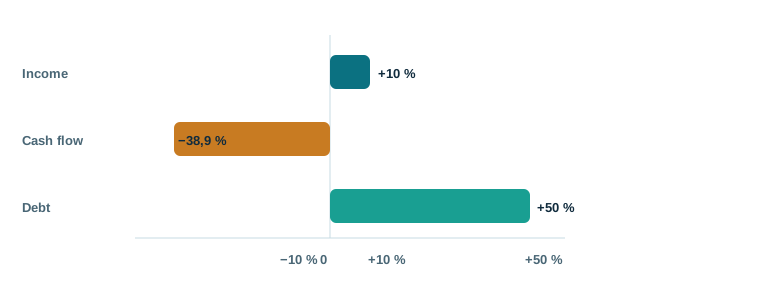
Cash flow falls by (11 − 18) ÷ 18 ≈ −38,9 % and debt goes up (45 − 30) and 30 = +50 %. Before interpreting the changes, it confirms that accounting periods, units and definitions are comparable. A common error is to mix quarter with full year, or million with thousands.
Propt 1 · Trackability analysis
Check the result: 100 to 110's + 10%, 18 to 11's − 38,9% about and 30 to 45's + 50%. If the AI writes otherwise, check his account and document. A dating table makes it easier to find mistakes and the quote can also be invented, so open it.
Generates with A scenarios without turning them into predictions
Solve with A · step by step
- What to give to the AI. Fictitious company: 100 basic income, 80 basic costs. Adverse scenario: income − 5% and costs + 8%. No odds are assigned.
- What to ask. It calculates income, costs and difference income - costs on an adverse and basis. Don't call the difference net gain because other components are missing. Separates data assumptions.
- That's something to check with you. Base: 20; adverse: 95 − 86,4 = 8,6. The results depend on assumptions and do not estimate the probability of each stage.
Propt ready to run
See the expected result and how to fix it
Independent monitoring: Base: 20; adverse: 95 − 86,4 = 8,6. The results depend on assumptions and do not estimate the probability of each stage.
These values are a didactic solution calculated with the case and are not a real response obtained from a model.
Follow-up request: It creates a sensitivities by changing income only, while maintaining costs 80, and explain how this new table responds.
Your AI exercise: run the prompt, compare the response with the monitoring and send the monitoring request. Write down a correct dataset, an omission or limit and how the response changes. If you don't get an error, check two statements anyway.
Concepts to check what the AI responds to
A stage isn't a prediction. Part of explicit assumptions and show what changes if one fails. Instead of "how much will I gain?," she puts forward "if income drops by 5% and costs rise by 8%, what figure does my assumption sheet change?" Do not mix real figures with an assumption without tagging them.
| Weak question | Applicable request | What to review |
|---|---|---|
| "will this action come up?" | "Summarize the risks and results of this dated report" | Dates, period and risks missed |
| "Is the floor profitable?" | "Calculates post-vacancy income and expenditure" | Costs, taxes and missing documents |
| "What crypto did I buy?" | "Comparison of custody, offer, liquidity and stated risks" | Issuer's source versus external verification |
For different assets, it retains the same discipline and changes the right source. For official actions, reports and communications, for funds, prospectus and costs, for cryptoagents, technical documentation, emission rules and supplier, and for property, registration documents, expenses and physical status. The AI can organize these data but do not turn an assumption into a fact.
Propt 2 · Stress Test
Quality monitoring: To demand a very secure explanation or a "confidence" score doesn't turn the answer into a reliable one. The ESMA warns about incorrect information, old-age and promise of AI signage.
Prepare your prompt and run it into an AI assistant
Solve with A · step by step
- What to give to the AI. Objective: To analyse changes in income from a fictitious case. Source: 100 at year A and 110 at year B. Fitted format: table with formulas. Limit: only information submitted.
- What to ask. Deliver an ready-to-copy prompt with goal, source, restrictions, output format and acceptance criterion. It then shows an example response clearly tagged as an example.
- That's something to check with you. The local creator of the course only writes text. To execute the request you have to copy it into an AI assistant and do not claim to consult a model itself.
Propt ready to run
See the expected result and how to fix it
Independent monitoring: The local creator of the course only writes text. To execute the request you have to copy it into an AI assistant and do not claim to consult a model itself.
These values are a didactic solution calculated with the case and are not a real response obtained from a model.
Follow-up request: Adapt the request so that, if year B is missing, the response says the calculation is unavailable and requests that data instead of inventing it.
Your AI exercise: run the prompt, compare the response with the monitoring and send the monitoring request. Write down a correct dataset, an omission or limit and how the response changes. If you don't get an error, check two statements anyway.
Concepts to check what the AI responds to
That tool creates text in your browserand does not send information to a server or consult with a model. Use only public or anonymous data. Filling the target and source, copies the prompt and then checks every reference that the AI produces.
Local prompt creator
The text written here remains on the tab until you close or recur it. Don't stick to credentials and personal information.
Try and leave the source blank. The creator will ask you to complete it, because without document or dated data the AI could fill gaps with unchecked information. He then changes his format: a quote and doubt table is easier to audition than an opinion paragraph.
If you later use an A or A search engine with web access, specify a cut date and order direct links to the primary sources. The current data can change; it opens every link and confirms that it really holds the sentence. If you just hit a partial extract, the result can only cover that extract.
Reforms with A an apparently convincing response
Solve with A · step by step
- What to give to the AI. Invented response: "Income + 10%, flow + 38,89%, debt + 50% and secure business." Actual fiscal data: income 100 → 110, flow 18 → 11, debt 30 → 45.
- What to ask. Check numbers and conclusions. Returns original text, error, verifiable calculation and corrected version. Do not turn an improved formulation into a guarantee of reliability.
- That's something to check with you. The flow drops − 38,89%. "Secure Business" isn't shown. The corrected response should recognize absent causes and data.
Propt ready to run
See the expected result and how to fix it
Independent monitoring: The flow drops − 38,89%. "Secure Business" isn't shown. The corrected response should recognize absent causes and data.
These values are a didactic solution calculated with the case and are not a real response obtained from a model.
Follow-up request: Generate an acceptance checklist for reviewing a new response: signs, units, periods, sources and unsupported conclusions.
Your AI exercise: run the prompt, compare the response with the monitoring and send the monitoring request. Write down a correct dataset, an omission or limit and how the response changes. If you don't get an error, check two statements anyway.
Concepts to check what the AI responds to
A useful response leaves a sign. Check independently the figure, date, unit, calculation and quote. He later asked what other information might change his conclusion. OpenAI's official documentation recommends clear instructions, relevant context and examples of outputand we have added a human check for every important financial data.
Propt 3 · Auditor of response
Check what you have learned
1. The AI cites a page that doesn't exist. What are you doing?
They mark that statement as unverified and come back to the original document. A date with a convincing look isn't evidence if it can't be found.
2. What's the difference in cash flow from 18 to 11?
(11 − 18) .18 ″ − 38,9%. It also checks that both figures use the same definition and period.
3. What's the difference between a stage and a foresight?
The stage shows the result under explicit assumptions. It does not stipulate that these assumptions will be met and does not assign probability to them without data.
Performance of the course
Now you can build prompts with a verifiable source, task and format, order scenarios without confusing them with predictions and audition an answer before using them. The AI is a research tool, not a substitute for the source or your criterion.
Back to course →Sources for deepening
- OpenAI official documentation: prompt engineering.
- OpenAI official documentation: clarity, context and examples.
- ESMA: warning about AI and investment.
Educational content with company and figures. It does not constitute financial advice or an investment recommendation.